2.2.2 Countries Trial Undertaken In
This section allows you to enter country specific data for your trial, this includes information such as number of patients and the number of site visits expected in each country.
Guidance on how to complete each of these sections is detailed below.
When you have added all of the information about your first country, click Add Record and you will then be able to repeat the process for every country in your trial.
Countries
Click in the text box and scroll down to find the country you require, alternatively you can start typing and select your desired country from the list as it updates. You can select more than one Country. When you select more than one Country the calculator automatically applies matching baseline parameters-such as patient counts, visit frequency, and visit duration-across all selected countries at once. Each country entry remains fully editable for any location-specific adjustments.
Number of participants
This is where you enter the number of participants per country. You can either type the number into the box directly, or hover over the box and use the up and down arrows that appear faintly to the right hand side of the box.
Number of expected in-person site visits
This is where you enter the number of in-person visits per trial, per country. An in-person visit is classed as a face-to face appointment where a trial participant meets with a professional associated with the trial. You can either type the number into the box directly, or hover over the box and use the up and down arrows that appear faintly to the right hand side of the box.
Average duration of visit
This is the average amount of time in hours for each in-person site visit. You can either type the number into the box directly, or hover over the box and use the up and down arrows that appear faintly to the right hand side of the box.
Number of remote visits
This is where you enter the number of remote visits per trial, per country. A remote visit is classed as any telephone or online virtual appointment where a trial participant discusses the trial with a professional associated with the trial. You can either type the number into the box directly, or hover over the box and use the up and down arrows that appear faintly to the right hand side of the box.
Average duration of remote visits
This is the average amount of time in hours for each remote visit. You can either type the number into the box directly, or hover over the box and use the up and down arrows that appear faintly to the right hand side of the box.
Low impact overnight bed days
A Bed Day is a 24 hour period in which a patient stays overnight at a hospital for treatment and monitoring. A Low Impact Overnight Bed Day, also known as a Low Dependency Bed Day, refers to a hospital stay where the patient is cared for as a regular in-patient and requires minimal medical intervention.
The UK Department of Health has defined levels of care for patients, and these have been adopted for this module.
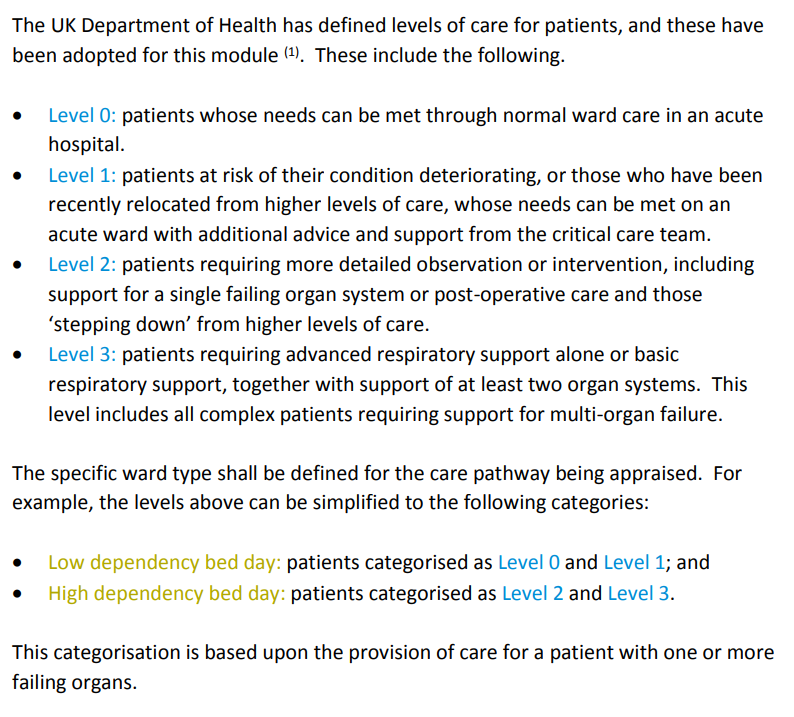
High impact overnight bed days
A Bed Day is a 24 hour period in which a patient stays overnight at a hospital for treatment and monitoring. A High Impact Overnight Bed Day, also known as a High Intensity Bed Day or a High Dependency Bed Day, refers to a hospital stay in the Intensive Care Unit by a trial participant.
Country Electric Emission Factor
Emission factors vary by country according to the national energy mix; specifically, electricity sourced from coal-heavy grids carries a higher carbon burden than that derived from nuclear or renewable infrastructure.
This field will be populated automatically from the country that you have selected. If the calculator does not have any country-specific data, a Global Default Emission Factor will be applied and you will be notified of this in the caption. If required you can override this by typing in the text box.
What you enter in this field will be used in the following sections to work out country specific electrical emissions:
- 2.5 Participants Other Device
- 2.7 Participant Travel
- 2.8 Trial Site
- 2.9 Trial Management
- 2.12 Samples
Fill in all required fields and click 'Add Record'. A green 'Record added successfully' message will appear at the top.
If any fields are missing, they will be highlighted in red. Simply fill those in and click 'Add Record' again.