Version 3.1
Release Date: October 2026
Overview
Version 3.1 of the calculator includes several new features and improvements. This page covers what's new and how to use these updates in your calculations.
Updated US Electricity Emission Factor
The US grid emission factor has been revised to account for transmission losses (4.2%). The updated rate is now 0.365 kg CO₂/kWh (previously 0.350 kg CO₂/kWh), this gives a more accurate carbon footprint calculation for trials in the United States.
This value will update automatically in any trial calculations involving US electricity usage.
General Information – Additional Trial Fields
We have added three new optional fields to the General Information section to help categorise the studies, these are:
- Therapeutic Area: Select the primary clinical area for the study using standard ClinicalTrials.gov classifications.
- Study Phase: Specify the study phase (e.g., Phase I, Phase II, Phase III, Phase IV).
- Trial Stage: Indicate the current status of the study, such as prospective (in design), inflight (ongoing), or retrospective (complete).
These optional fields do not affect any carbon calculations.
2.2.2 Streamlined Multi-Country Trial Setup
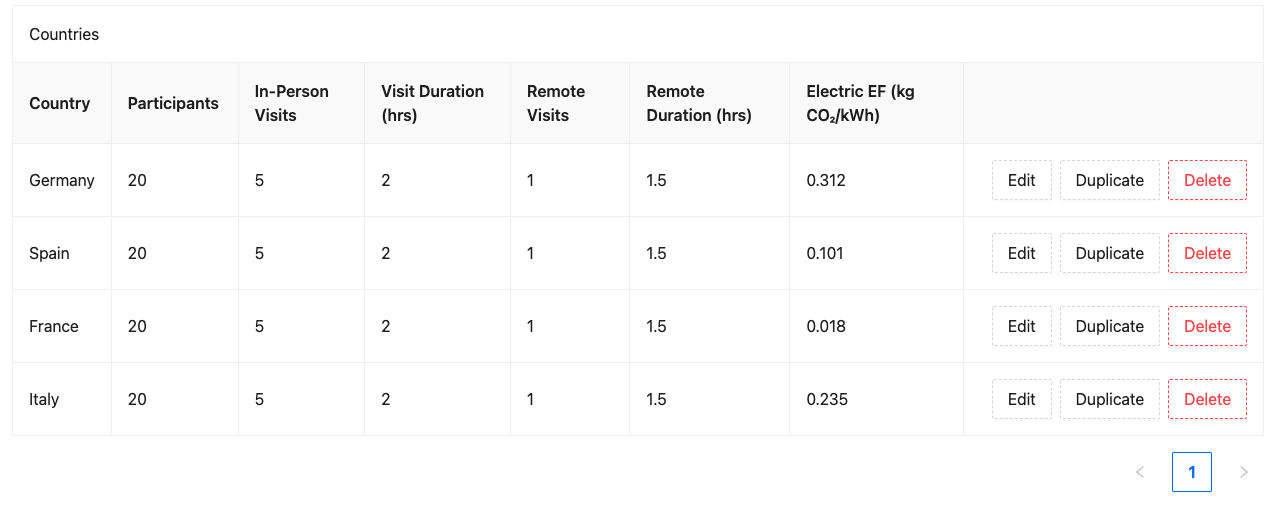
Section 2.2.2 now supports multi-country selection to speed up data entry for large global studies.
When you select multiple countries simultaneously, the calculator automatically applies matching baseline parameters-such as patient counts, visit frequency, and visit duration-across all selected countries at once. Each country entry remains fully editable for any location-specific adjustments.
2.3 Interventional Products – Kit Weight Wording Update
The guidance wording in this section has been updated to clarify that the total kit weight (in kilograms) must include all gel packs, dry ice, shipping, and packaging materials. This ensures accurate calculations for supply chain emissions.
2.5 Other Devices – Custom Devices
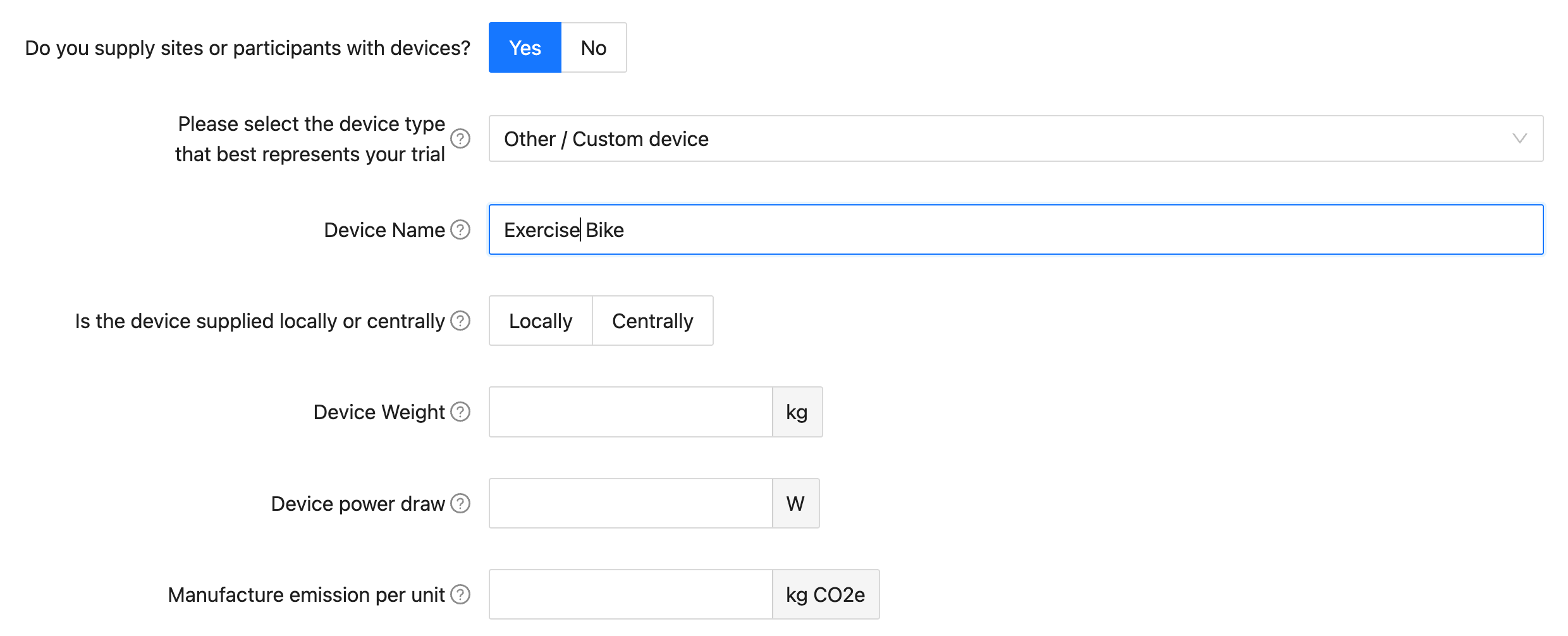
Previous versions of the calculator limited patient devices to smartphones, tablets, or smartwatches. The calculator now includes an Other/Custom Device option, allowing you to model additional equipment supplied to participants (e.g., exercise bikes). You can directly configure the unit's weight, wattage, manufacturing emissions, and usage profile so all trial hardware is included.
2.5 Other Devices – Multiple Supply Locations
Similar to other sections (such as interventional products and lab kits), you can now select multiple supply countries per device. Previous versions supported only a single supply country.
2.6 Procedures – Decimal Value Support
Following user feedback, you can now enter decimal values for procedures. This accounts for trials where not all participants require a specific procedure e.g., an X-ray.
For example, if 1 out of 2 participants in a study requires an X-ray, you can enter the average number of X-rays per participant as 0.5.
2.6 Procedures – New PET/CT Scan Emission Factors
Based on recent Life Cycle Assessment (LCA) research published on PET and CT scanners, we have added emission factors for two specific models to this section, these are:
- PET/CT scan (Siemens Biograph): 5.99 kg CO₂ per scan
- PET/CT scan (GE VCT scanner): 8.01 kg CO₂ per scan
Users can now specify the total number of scans per participant for both Siemens Biograph and GE VCT models under the Procedures section.
Patient travel emissions have been excluded from these factors to avoid double-counting with travel sections.
2.9 Trial Management
Default Staff Hours Calculation Fix
There was an issue where the default calculation for trial management staff hours was not scaling correctly with study parameters, this has now been resolved. The calculation now properly factors in total participant visits (Patients × Visits per Patient), ensuring default estimates scale accurately as visit frequency increases.
Guidance Text Updates
We updated the guidance text to reference "an office" rather than "trial sites." This clarifies that Section 2.9 accounts specifically for central trial management staff (such as trial managers, data managers, and statisticians) rather than site-based clinical staff.
2.10.4 Ethics Meetings Allocation
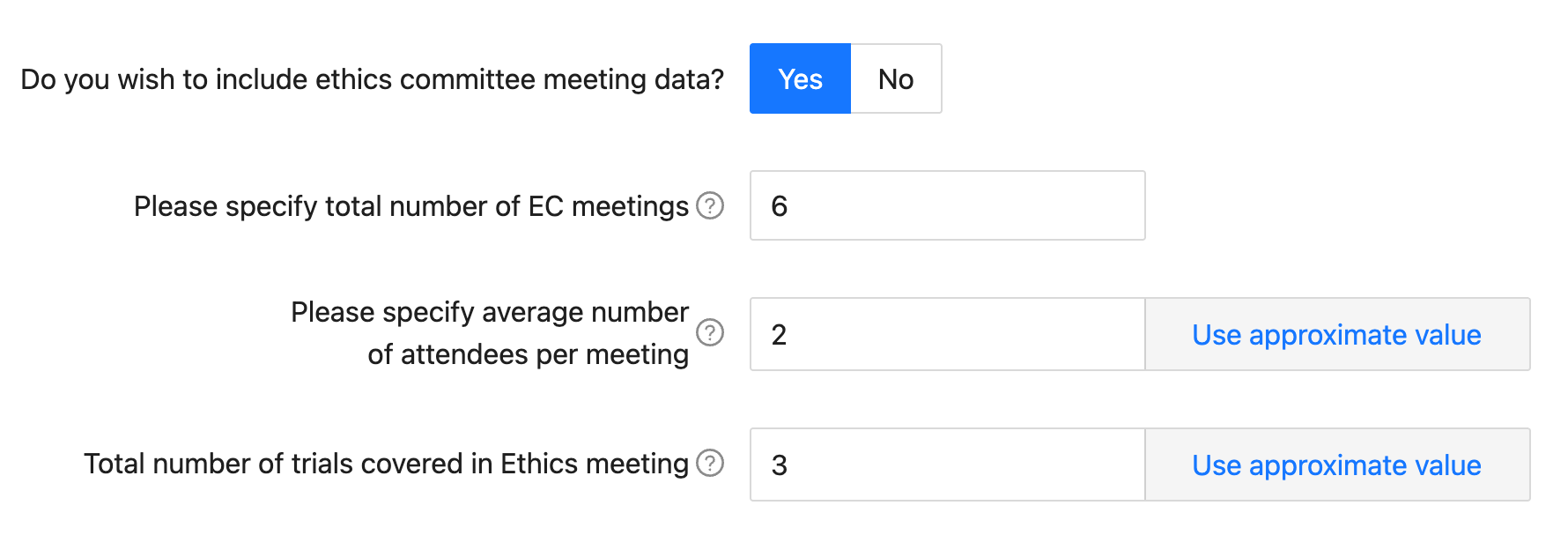
In previous versions of the calculator, 100% of an ethics committee meeting's emissions were allocated to a single trial. In practice, ethics committees often review several trials during a single session.
This update introduces a new field: 'Total number of trials covered in Ethics meeting'. Entering the total number of studies discussed during the meeting ensures emissions are allocated proportionally.
For example, if 3 trials are reviewed during a single ethics meeting, the calculated emissions for that session will automatically be divided by 3.
Results Page Improvements
Export Results to an XLSX File
You can now export trial results directly into an XLSX spreadsheet for quick reporting and analysis.

Export Comparison Page as PDF or JSON
Data from the comparison page can now be exported as either a formatted PDF report or a raw JSON file, making it easier to share summary comparisons with stakeholders or run further custom analyses.
Visual Improvements
Visual updates have been made to the results page to highlight key data. We have added icons and structured data cards for improved readability.
Country Breakdown Map & Data Table
An interactive map has been added to the results page so you can see how emissions are spread out across different countries in multi-national studies. Instead of using an average, the map uses your specific trial inputs to highlight real regional differences. You can also use the toggle to switch between the map and a breakdown table.